Why do brokerages choose SkySlope?
A brokerage chooses a transaction platform on how it handles eight jobs: file review and compliance, forms and e-signature, commissions and the back office, reporting, integrations, security, training and support, and whether agents will actually use it. Brokers quoted on SkySlope’s own pages credit it with faster compliance review, support that answers, and deal data that moves between systems without retyping.
SkySlope covers the deal from signed agreement to commission payout with transaction management, Forms, DigiSign, Offers and Books, and says it serves over 900,000 real estate professionals.

Key takeaways
- Evaluate a platform in eight areas, and score each one in the demo using your own files and your own commission plan.
- SkySlope’s products run from agreement to payout: Forms, DigiSign, Offers, transaction management, Books and SkySight, with documented handoffs between them.
- Brokers quoted on SkySlope’s product pages point to compliance review. DPR Realty says Quick Audit lets it audit files “within minutes of submission.”
- In SkySlope’s own figures, over 900,000 real estate professionals and 3.6K brokerages use SkySlope, including 35% of the top 100 brokerages.
- Plan for adoption: in NAR’s 2026 Member Profile, 31% of REALTORS® rarely or never use transaction management software.
What a broker-owner evaluates in a platform
What does a broker-owner evaluate before choosing a platform?
Most firms already put some of this in agents’ hands. In NAR’s 2025 Profile of Real Estate Firms, 73% of firms provided or encouraged electronic contracts and forms, 70% e-signature and 36% transaction management software, rising to 58% among firms with four or more offices. A third of firms (34%) named keeping up with technology among their biggest challenges for the next two years. In NAR’s 2025 Technology Survey, 39% of REALTORS® said they get transaction management tools through their broker.
These are the eight areas that decide whether a platform works for a brokerage. The last column is where SkySlope answers each one; the sections below quote what it says. For a vendor-neutral feature checklist, see our buying guide to real estate transaction management software.
| Area | Ask in the demo | Where SkySlope answers |
|---|---|---|
| File review and compliance | Show one file going from upload to approved, and what the agent sees when a document is rejected. | Custom checklists, Quick Audit and Smart Assist in SkySlope |
| Forms and e-signature | Are our association’s forms and our own brokerage forms in the library, and do signed documents file themselves into the deal? | Forms with MLS data and Broker Libraries; DigiSign |
| Back office and commissions | Run our most complicated commission plan, with a cap and a team split. | SkySlope Books |
| Data and reporting | What does the broker see on Monday morning without building a report? | Broker dashboard, Books reports and SkySight briefings |
| Integrations and API | Which of our systems connect, and can we pull our own data out? | Integrations and three client APIs |
| Security | Which independent audit covers the platform, for which trust principles, over which period? | SOC 2 Type 2 for security, availability and confidentiality |
| Training and support | Who answers at 9 p.m. on a Saturday, and how long is agent training? | Support around the clock; on-demand training |
| Agent adoption | What can an agent do from a phone, and what happens when they skip a document? | iOS and Android app; daily reminders on flagged items |
Which SkySlope product owns each stage of a deal
Follow a listing from signed agreement to the broker’s weekly report and it passes through up to six SkySlope products. The bars show which product does the work at each stage; the dots show where the deal’s data moves to the next product without being typed again.
File review and compliance
How does SkySlope handle compliance review?
Review in SkySlope runs on checklists. A broker builds custom checklists for agents; marking an item sends the agent a daily reminder until it is uploaded; and Inbox Update sends a copy of chosen documents to the office inbox for an auditor. Auditors work in Quick Audit, which SkySlope says will let admins “triple their productivity,” and Smart Assist detects completed signatures and initials, highlights what appears ready for approval and suggests possible compliance issues. File Sharing lets a team work on documents while logging every edit by user and time stamp.

“Quick Audit allows us to audit files within minutes of submission. We are seeing more files completed at the end of escrow, making our agents happy to receive their checks sooner.”Dale Milton, DPR Realty, LLC, on SkySlope’s transaction management page
“We looked at every product on the market. We had a lot of demonstrations. Everybody promised us the moon. As we dug down into the nitty-gritty and looked at the challenge we had with compliance, quite frankly, the only solution was SkySlope.”Merrily Hackett, Owner and General Manager of Sutton Group-West Coast Realty, on SkySlope’s DigiSign page
How one broker can run this review without an admin team is covered in our guide to compliance for small brokerages.
Forms, e-signature and offers
What does SkySlope offer for forms and e-signature?
SkySlope Forms pulls listing data from the MLS into every form in a file, and keeps the brokerage’s own forms in Broker Libraries, which SkySlope’s support team updates when the brokerage changes language, adds disclosures or adjusts fees. Forms Broker Edition adds broker templates and clauses, File Sharing, TC Access, and a Buyer Agreement page where administrators search, review and accept agents’ buyer agreements.
DigiSign is SkySlope’s e-signature tool, with unlimited envelopes, strike-through and markup tools, and completed documents filed into the transaction record. It costs an agent $6.25 a month billed annually, and bulk plans are available for brokerages. On the listing side, SkySlope Offers puts every offer on one page and hides buyer names during review “to prevent the potential for bias,” and Breeze turns seller disclosures into a guided questionnaire for clients. In California, Breeze includes a mobile AVID for the agent’s walk-through.
Back office and commissions
Does SkySlope include commission and accounting software?
Yes, as an add-on. SkySlope Books is back office accounting and commission disbursement for brokerages. Its formulas apply fees, royalties and tiered commission splits; team caps adjust in real time; invoices and recurring fees post automatically; and payments and transfers are made the next business day. Once a deal is created in SkySlope, its property address, status and agent details can sync into Books, and Books has an API integration to QuickBooks. SkySlope’s July 2026 product update added multiple commission payors, rolling commission caps and multi-condition commission tiers.
“Integrating both with SkySlope and now Books, has helped us stay ahead of the curve and offer these simple ways for our agents to be able to stay in compliance and get paid as quickly as possible.”Jamie Mertz, VPR, on SkySlope’s Books page
What to test in any commission system is covered in our guide to real estate back office software.
Data and reporting
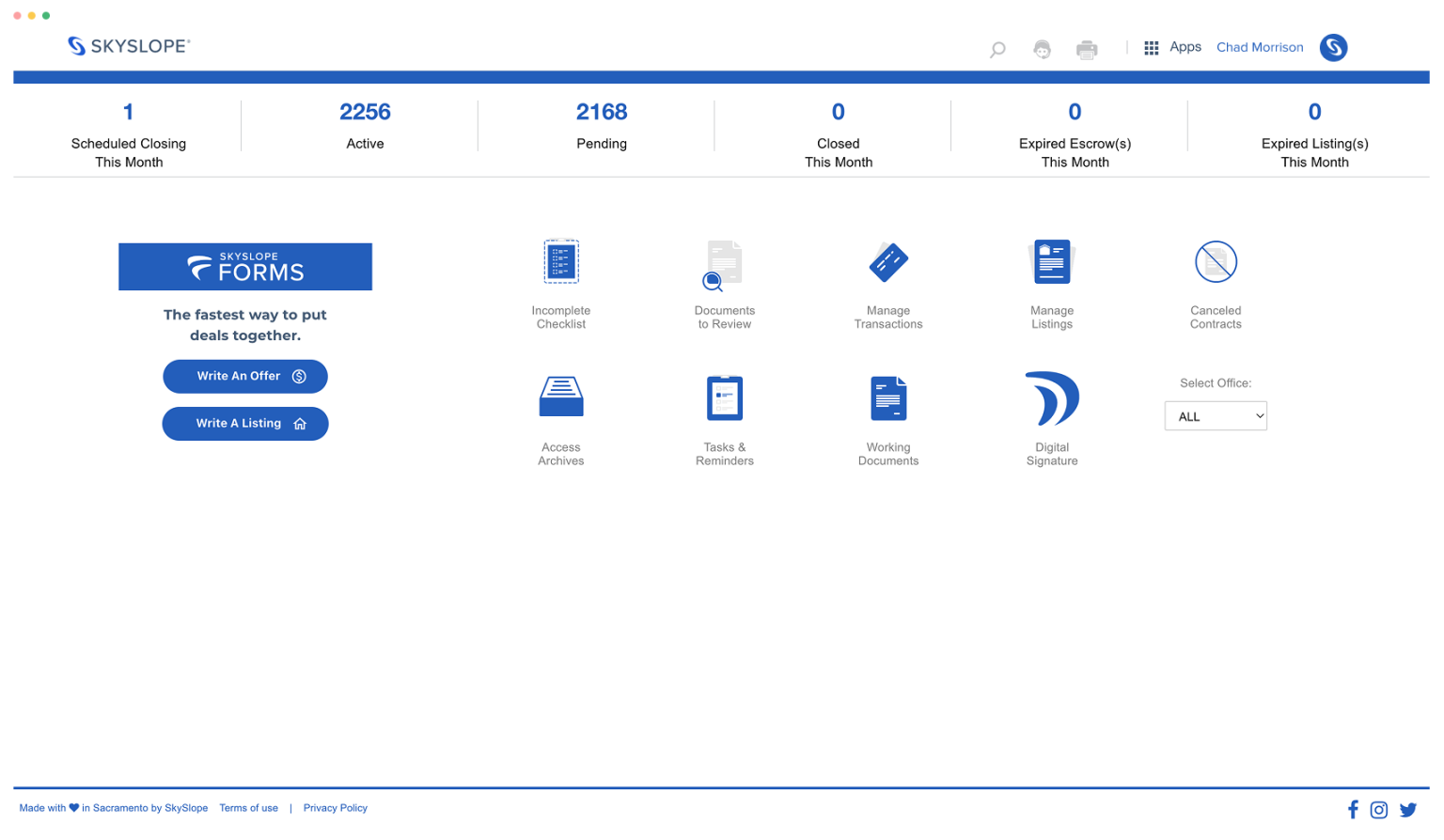
The broker dashboard shows scheduled, active and pending deals in one view, with documents a click away. Books adds real-time dashboards for agent, team or office performance, and custom reports that SkySlope says generate “in seconds.” SkySight, an iOS app in SkySlope’s Smart Suite, turns the brokerage’s data into weekly visuals and a four-minute AI podcast that arrives every Monday, with metrics the dashboard does not show, such as listing growth and transaction growth.
Integrations and the Open API
Does SkySlope integrate with other software?
SkySlope’s integrations page calls it “the central hub for all the tools you use on a daily basis,” from CRM to accounting. Brokerages with their own systems can use SkySlope’s Open API: in an August 2025 post, SkySlope lists a Transaction Management API to connect transactions to reporting tools and dashboards, a Forms API to review form libraries, create and manage Forms files and retrieve signed documents, and an Offers API for listings, offers and analytics, all available to current clients.
One example from May 2026: Cloze expanded its SkySlope integration so agents can create pre-filled SkySlope Forms from a client record in Cloze, while transactions, listings and contacts sync from SkySlope into Cloze. William Raveis uses both, according to the release:
“We want our agents to be able to focus on the client in front of them, rather than think about what system they’re in.”Ryan Raveis, co-president of William Raveis, in SkySlope’s May 20, 2026 release
“Our agents like that it’s easy to use and it requires very little training. We’re in a world where all applications should be talking with one another. We have a proprietary back-end financial system, which actually pulls the data from SkySlope every two hours. So our admins no longer have to do double data entry.”Matthew Borland, COO and Managing Broker, Zephyr Real Estate, in a 2018 SkySlope customer story
Security
Is SkySlope secure?
SkySlope announced in April 2022 that its suite is SOC 2 Type 2 compliant, “certified by an external audit firm in the trust principles of security, availability, and confidentiality.” SOC 2 is an AICPA standard under which an independent auditor tests a company’s controls; a Type 2 report tests whether they worked over a period of time. SkySlope lists encryption in transit and at rest, a 99.99% uptime target, regular backups kept in multiple regions, and independent penetration testing. Inside the products, File Sharing logs every edit by user and time stamp, and Offers keeps an activity log for every offer.
Firms watch these risks too: in NAR’s 2025 firms profile, 13% named liability in a digital world among their biggest challenges, 10% wire fraud and 8% protecting client data. Ask any vendor for its most recent SOC 2 Type 2 report and the period it covers.
Training and support
SkySlope’s contact page says its “award-winning support team is available around-the-clock.” The award on SkySlope’s company timeline dates from 2016, when its support team won First Place in Customer Happiness from NiceReply. Training is on demand: SkySlope’s training page lists a 17-minute admin course for transaction management, a 15-minute getting-started session on Forms for managing brokers and admins, agent onboarding sessions of 50 and 65 minutes, and a 55-minute recorded session in Spanish. Books onboarding includes setup, configuration and training with a dedicated onboarding specialist.
“Their support and their responsiveness is second to none. It really is fantastic,” Cannon said. “I know if I send them an email, I’m gonna get a response, and I’m actually going to get a resolution.”Taylor Cannon of NextHome, which has more than 550 franchise offices and 5,500 agents, in SkySlope’s May 2026 podcast story
Century 21 Judge Fite Company, with 1,100 agents across 26 offices in Texas and Oklahoma, briefly switched to another platform and came back. In SkySlope’s interview, what stood out to Davi Bryce, its Manager of Systems and Admin, was how fast SkySlope’s team fixed an extra space in a name field that was disrupting one agent’s workflow. Brokerages that want the paperwork done for them can use SkyTC, SkySlope’s transaction coordination service; SkySlope says agents who use it save an average of 10 hours per deal.
Will agents use it?
Do agents use the platform their broker provides?
Many do not use it often. In NAR’s 2026 Member Profile, 27% of REALTORS® use transaction management software daily or nearly every day, and 31% rarely or never. Electronic contracts and forms (40% daily) and e-signature (35%) get more use. In NAR’s 2025 Technology Survey, 66% of REALTORS® said they adopt new technology mainly to save time, and 67% agreed or strongly agreed that their brokerage gives them all the technology tools they need.
So the test is what saves an agent time. What SkySlope publishes on that:
- Phone first: the SkySlope app for iOS and Android, for forms, checklists, uploads, MLS data and e-signature.
- Voice: Voice Offers & Agreements starts agreements by voice, in California and North Carolina for now.
- Fewer uploads by hand: Auto-Split and Assign scans an uploaded PDF, splits it and routes each document to its checklist item; SkySlope reports a 97% reduction in agent time spent.
- Nudges: marked checklist items send the agent a daily reminder until the document arrives.
On NextHome’s largest office, Taylor Cannon told SkySlope: “We just signed our biggest office to date, and they’re using SkySlope start to finish,” adding, “They’re doing Books, they’re doing everything.” The NextHome story has the full conversation.
What SkySlope publishes about who uses it
These are the figures SkySlope publishes about who uses it, each quoted exactly as SkySlope states it:
| What SkySlope says | Where | Date |
|---|---|---|
| “Empowering over 900,000 real estate professionals across the U.S. and Canada, SkySlope manages over 3 million transactions annually” | Home page | Updated October 21, 2026 |
| “3.6K Leading brokerages trust SkySlope with their business” | Company page | Updated April 1, 2025 |
| “35% of the top 100 brokerages, including William Raveis Real Estate, eXp Realty, NextHome, SERHANT., and many others, run on SkySlope” | Open API post | August 25, 2025 |
| “35% Of the top 20 U.S. brokerages use SkySlope” and “30M Transactions processed” | Member benefits page | Updated July 30, 2026 |
Read on skyslope.com on November 3, 2026. Dates are the page’s own publish or last-updated date.
Evaluating SkySlope for your brokerage
SkySlope Suite pricing starts at $340 per month, with no long-term contracts required. SkySlope Forms is included; DigiSign and Books are add-ons. SkySlope builds each demo to the brokerage, so bring what will show the platform working on your business:
- One recent file of each type you handle, with its real documents.
- Your current checklists and your most complicated commission plan.
- The systems that must connect: CRM, accounting, MLS and any reporting tools.
- The reports you read every week.
- Two agents for the follow-up: one top producer and one newer agent.
FAQ
Why do brokerages choose SkySlope?
Brokers quoted on SkySlope’s own pages credit it with faster compliance review, support that answers, and deal data that moves between systems without retyping. DPR Realty says Quick Audit lets it audit files within minutes of submission, and NextHome’s Taylor Cannon calls SkySlope’s support and responsiveness second to none. The suite covers a deal from agreement to payout: Forms, DigiSign, Offers, transaction management and Books.
How many brokerages use SkySlope?
SkySlope’s company page says 3.6K brokerages trust SkySlope with their business. Its home page says it serves over 900,000 real estate professionals in the U.S. and Canada and manages over 3 million transactions a year. In an August 2025 post, SkySlope said 35% of the top 100 brokerages run on SkySlope, naming William Raveis Real Estate, eXp Realty, NextHome and SERHANT.
How much does SkySlope cost for a brokerage?
SkySlope Suite pricing starts at $340 per month, with no long-term contract required. SkySlope Forms is included, and DigiSign and SkySlope Books are add-ons. DigiSign on its own costs an agent $6.25 a month billed annually, and SkySlope offers bulk DigiSign plans for brokerages.
Is SkySlope secure?
SkySlope announced in April 2022 that its suite is SOC 2 Type 2 compliant, audited by an external firm for security, availability and confidentiality. It lists encryption in transit and at rest, a 99.99% uptime target, backups in multiple regions and independent penetration testing. Ask for the current SOC 2 report and the period it covers.
Does SkySlope have an API?
Yes. SkySlope gives current clients a Transaction Management API, a Forms API and an Offers API, so a brokerage can connect its SkySlope data to reporting tools, dashboards and other systems. SkySlope Books has an API integration to QuickBooks.
What support and training does SkySlope offer?
SkySlope says its award-winning support team is available around the clock. Its help center lists on-demand training, including a 17-minute admin course for transaction management, agent onboarding sessions of 50 and 65 minutes, and a 55-minute recorded session in Spanish. Books onboarding includes setup, configuration and training with a dedicated onboarding specialist.
See your own files, checklists and commission plan in SkySlope.
Request a demo →Sources
- SkySlope, transaction management product page. skyslope.com/products-services/skyslope/
- SkySlope Forms. skyslope.com/products-services/forms/
- SkySlope Forms Broker Edition. skyslope.com/broker-edition/
- SkySlope DigiSign. skyslope.com/products-services/digisign/
- SkySlope Offers. skyslope.com/products-services/offers/
- SkySlope Books. skyslope.com/products-services/books/
- SkySlope SkyTC. skyslope.com/products-services/skytc/
- SkySlope Smart Suite. skyslope.com/smart-suite/
- SkySlope SkySight. skyslope.com/skysight-mobile-app/
- SkySlope Mobile. skyslope.com/skyslope-mobile/
- Breeze AVID. skyslope.com/breeze-avid/
- SkySlope integrations. skyslope.com/integrations/
- SkySlope, Open API ecosystem (August 25, 2025). skyslope.com/general/unlocking-the-power-of-your-data/
- SkySlope, SOC 2 Type 2 announcement (April 2022). skyslope.com/product/soc-2/
- SkySlope pricing. skyslope.com/pricing/
- SkySlope home page. skyslope.com/
- SkySlope company page. skyslope.com/company/
- SkySlope member benefits. skyslope.com/member-benefits/
- SkySlope, contact us. skyslope.com/about-us/contact-us/
- SkySlope help center, SkySlope training. support.skyslope.com/support/solutions/articles/156000366309-skyslope-training
- SkySlope, everything that’s new (July 28, 2026). skyslope.com/product/everything-thats-new-for-you-in-skyslope/
- SkySlope, NextHome podcast story (May 19, 2026). skyslope.com/general/nexthome-skyslope-podcast/
- SkySlope, why Century 21 Judge Fite Company returned (June 24, 2026). skyslope.com/general/why-century-21-judge-fite-company-returned-to-skyslope/
- SkySlope, Cloze and SkySlope expand integration (May 20, 2026). skyslope.com/press-release/cloze-and-skyslope-expand-integration-to-automate-real-estate-transaction-paperwork/
- SkySlope, In their own words: brokerages discuss SkySlope (2018). skyslope.com/transaction-management/in-their-own-words-brokerages-discuss-skyslope/
- NAR, 2025 Profile of Real Estate Firms. cms.nar.realtor/sites/default/files/2025-11/2025-profile-of-real-estate-firms-11-19-2025.pdf
- NAR, 2026 Member Profile (hosted by the Buffalo Niagara Association of REALTORS). www.bnar.org/downloads/NARmemberprofile2026.pdf
- NAR, 2025 REALTORS® Technology Survey. cms.nar.realtor/sites/default/files/2025-09/2025-realtors-technology-survey-report-09-18-2025.pdf

